
Payroll settings: NSSF, HESLB, PAYE and the school's other costs
Set the pension, student loan, income tax and employer levy rates payroll uses, and the day staff are paid. Do this once before the first payroll.
Payroll → Payroll Settings holds the rates payroll uses to work out every payslip. You set them once and change them only when the law or your school's policy changes. Payroll then does the arithmetic for everyone.
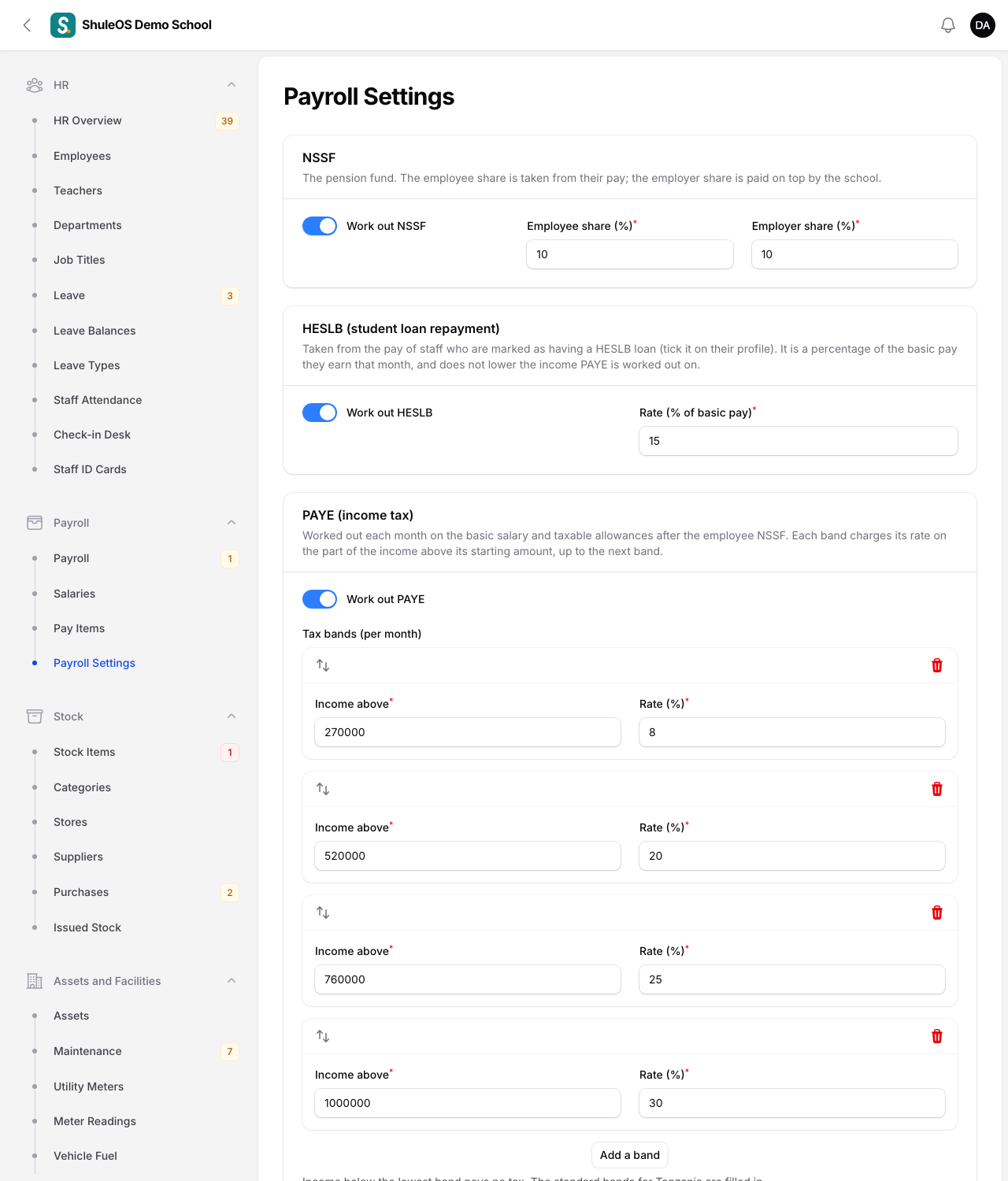
The standard Tanzania rates are filled in for you. Check them with your accountant before the first payroll, because they decide what staff take home.
NSSF
NSSF is the pension fund. The employee share is taken from the person's pay. The employer share is paid on top by the school.
- Work out NSSF: switch on to calculate it.
- Employee share (%) and Employer share (%): the two rates.
NSSF is worked out on the basic salary and on the pay items marked "NSSF is worked out on it". A person whose Pays NSSF switch is off on their employee record pays none.
HESLB (student loan repayment)
HESLB is the Higher Education Students' Loans Board. Staff who are repaying a student loan have a share of their basic pay taken for it each month.
- Work out HESLB: switch on to calculate it. It is on by default, and only affects people you mark as having a loan.
- Rate (% of basic pay): 15% is filled in, the usual rate. Change it if the Board tells your school a different one.
HESLB is taken only from staff whose Has a HESLB loan switch is on in their employee record. It is a share of the basic pay they actually earn that month, so it is smaller in a month with unpaid leave. It does not lower the income PAYE is worked out on. If you switch HESLB off and on again, the rate you entered is kept.
PAYE (income tax)
PAYE is worked out each month on the basic salary and the taxable pay items, after the employee's NSSF is taken off.
- Work out PAYE: switch on to calculate it.
- Tax bands (per month): each row has Income above (the amount where the band starts) and Rate (%). A band charges its rate on the part of the income above its starting amount, up to the next band. Income below the lowest band pays no tax. Click Add a band for another row.
A person whose Pays PAYE switch is off on their employee record has no PAYE taken.
Employer's other costs
Paid by the school on top of salaries. They are shown in what payroll costs the school, and they never reduce anyone's pay.
- WCF (workers compensation) and its rate (% of gross pay).
- SDL (skills and development levy) and its rate (% of gross pay).
Switch each one on if your school pays it, and enter the rate.
Pay day
Day of the month staff are paid (1 to 31). It is shown on payslips and the payroll pages.
Click Save settings. You see "Payroll settings saved".
Changing a rate later. A payroll that is already approved never changes. A draft or in-review payroll can be recalculated with the new rates (see Run the monthly payroll).
If something goes wrong
| What you see | What it means and what to do |
|---|---|
| A rate or band field will not accept a value | Rates are between 0 and 100. Each band needs an Income above amount and a Rate. |
| The pay looks wrong for one person | Check their basic salary, their pay items, and whether Pays NSSF, Pays PAYE and Has a HESLB loan are set correctly in their employee record. |
| You cannot open Payroll Settings | Your role does not include managing payroll. |
Related guides
- Set salaries and pay itemsGive every employee a basic salary, create the allowances and deductions the school uses, attach them to people, and preview what each person will be paid.
- Run the monthly payrollPrepare a month's payroll, check it, add one-off amounts, send it for review, approve it, print payslips and the bank file, and record that it was paid.