
The class attendance report
See your class's attendance for the month, day by day, with each child's percentage, and download the register.
Checked on the ShuleOS demo school
Who: Class teacher 3 min read
Class Report shows your class's attendance for a month.
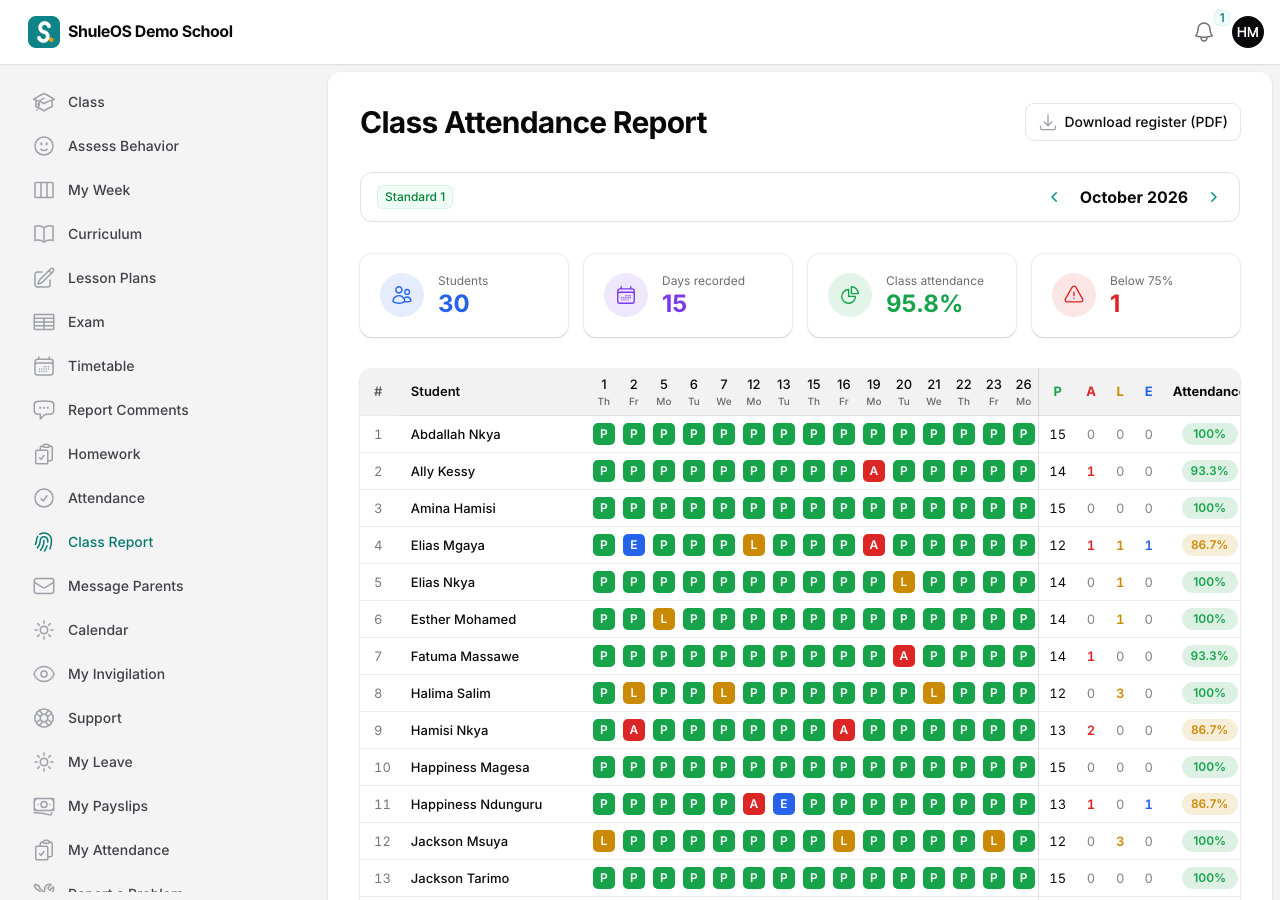
Each row is one child. Each column is a school day of the month (for example "1 Tu", "2 We"), and each cell shows a letter for that day: P (present), A (absent), L (late) or E (excused). On the right are the totals: how many of each, and the Attendance percentage.
- Use the arrows beside the month name to move to the previous or next month. If you are class teacher of more than one class or section, choose which one at the top.
- Click Download register (PDF) to get the register as a printable page for your file or the head teacher.
Use the report to spot a child who is often absent or late, so you can talk to the parents early. The percentage counts present and late days out of the days the register was taken. Excused days and days with no register are left out.
If something goes wrong
| What you see | What it means and what to do |
|---|---|
| Class Report is missing | You are not the class teacher of a class this year. |
| Days with no letters | The register was not taken on those days. Take it from Take class attendance. |